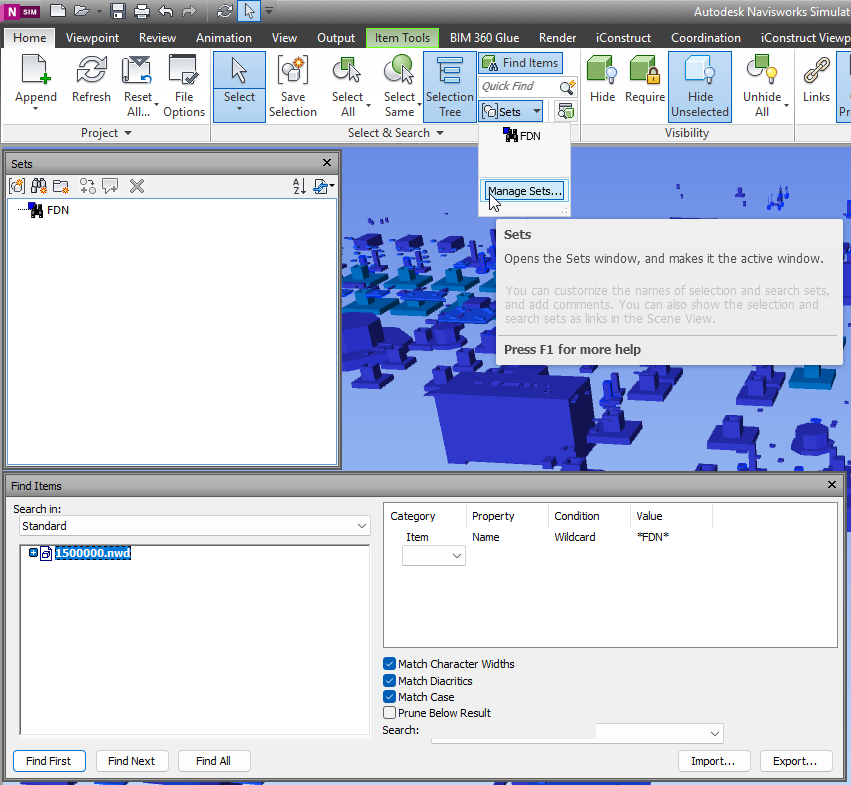
With NavisWorks Simulate and Manage you can use Find Items panel to search across details. Usual flow – is to identify Category and properites which allow to find right element. Then design the query. If query is correct – you can proceed with result, if not you can adjust query. When you query is perfect, and for some reason you may need it again – sets are desinged to help you.
When you get collection of search sets – it might be userfull to export it and use same set with another NavisWorks models. So lets dive deeper it this matter.
The code below shows how to create a table and fill in its cells. Some obsolete methods of Table are still visible. You will receive a warning in compiling if using obsolete methods. Please use the newest methods.
[CommandMethod("testaddtable")]publicvoidtestaddtable(){Databasedb=HostApplicationServices.WorkingDatabase;using (Transactiontr=db.TransactionManager.StartTransaction()) {BlockTablebt= (BlockTable)tr.GetObject(db.BlockTableId,OpenMode.ForRead);ObjectIdmsId=bt[BlockTableRecord.ModelSpace];BlockTableRecordbtr= (BlockTableRecord)tr.GetObject(msId,OpenMode.ForWrite); // create a tableTabletb=newTable();tb.TableStyle=db.Tablestyle; // row numberInt32RowsNum=5; // column numberInt32ColumnsNum=5; // row heightdoublerowheight=3; // column widthdoublecolumnwidth=20; // insert rows and columnstb.InsertRows(0, rowheight, RowsNum);tb.InsertColumns(0, columnwidth, ColumnsNum);tb.SetRowHeight(rowheight);tb.SetColumnWidth(columnwidth);Point3deMax=db.Extmax;Point3deMin=db.Extmin;doubleCenterY= (eMax.Y+eMin.Y) *0.5;tb.Position=newPoint3d(10, 10, 0); // fill in the cell one by onefor (inti=0; i<RowsNum; i++) {for (intj=0; j<ColumnsNum; j++) {tb.Cells[i, j].TextHeight=1;if (i==0&&j==0)tb.Cells[i, j].TextString="The Title";elsetb.Cells[i, j].TextString=i.ToString() +","+j.ToString();tb.Cells[i,j].Alignment=CellAlignment.MiddleCenter; } }tb.GenerateLayout();btr.AppendEntity(tb);tr.AddNewlyCreatedDBObject(tb, true);tr.Commit(); }}
First, we need a tool plugin with mouse down Interceptor:
usingAutodesk.Navisworks.Api;usingAutodesk.Navisworks.Api.Plugins; [Plugin("PickModelPointPlugin", "ADSK")]classPickModelPointPlugin : ToolPlugin {publicoverrideboolMouseDown(Viewview, KeyModifiersmodifiers,ushortbutton, intx, inty,doubletimeOffset) { // get current selectionPickItemResultpickedResult=view.PickItemFromPoint(x, y);if (pickedResult!=null) {Autodesk.Navisworks.Api.Point3DclickedPoint=pickedResult.Point; // Sent to static exchange, to make click result available // for Addin Plugins in namespace // convert to custom Point, to reduce coupling. StaticExchange.PickedPoint=newcPoint(clickedPoint.X,clickedPoint.Y,clickedPoint.Z); }returnbase.MouseDown(view, modifiers, button, x, y, timeOffset); } }
First, we need a tool plugin with mouse down Interceptor:
Obviously, we may need to do some actions as soon as user click on something. That`s why event delegate has been presented in StaticExchange. Finally, in our Addin we call A plugin and await for result. In my case it’s a form with buttons, so on a button I bind click handler:
privateasyncvoidbtnPickNavisPoint_Click(objectsender, EventArgse){try { //search for plugin availability ToolPluginRecordtoolPluginRecord= (ToolPluginRecord)ANA.Application.Plugins .FindPlugin("PickModelPointPlugin.ADSK"); //set Plugin for execution ANA.Application.MainDocument.Tool .SetCustomToolPlugin(toolPluginRecord.LoadPlugin()); //Subscribe on eventStaticExchange.PointUpdate+=onPointUpdate; //Patiently wait for resultPoint3Dresult=awaitWaitForUserChoiceAsync();MessageBox.Show("Point: "+"X:"+result.X.ToString("0.##") +" "+"Y:"+result.Y.ToString("0.##") +" "+"Z:"+result.Z.ToString("0.##") +" "); }catch (Exceptionex) {MessageBox.Show(ex.Message); }finally { //Unsubscribe and switch back to Tool.SelectStaticExchange.PointUpdate-=onPointUpdate; ANA.Application.MainDocument.Tool.Value=Tool.Select; } }
And now final peace – where magic is live.
Declare TaskCompletionSource,
Wrap it into WaitUserChoice.
In event handler call Source and pass argument.
privateTaskCompletionSource<Point3D> _userChoiceTcs;privateasyncTask<Point3D> WaitForUserChoiceAsync() { // Create a new TaskCompletionSource for this operation_userChoiceTcs=newTaskCompletionSource<Point3D>();try {Point3Dresult=await_userChoiceTcs.Task;returnresult; }finally { // Clean up_userChoiceTcs=null; } }privatevoidonPointUpdate(PointEventArgsp) { //Here come the user click result_userChoiceTcs?.TrySetResult(newPoint3D(p.Point.X,p.Point.Y,p.Point.Z)); }
As a result we got message with coordinates of clicked points, as soon as user click on some object.