How to create a Table and fill in its cells with .NET

originally this article was available at

https://adndevblog.typepad.com/autocad/2012/05/how-to-create-a-table-and-fill-in-its-cells-with-net.html

But now this source is not available anymore. So this is copy paste from web-archive for my own memory

05/16/2012

How to create a Table and fill in its cells with .NET

By Xiaodong Liang

The code below shows how to create a table and fill in its cells. Some obsolete methods of Table are still visible. You will receive a warning in compiling if using obsolete methods. Please use the newest methods.

[CommandMethod("testaddtable")]
public void testaddtable()
{
    Database  db =
        HostApplicationServices.WorkingDatabase;
 
    using (Transaction tr =
        db.TransactionManager.StartTransaction())
    {
        BlockTable bt =
            (BlockTable)tr.GetObject(db.BlockTableId,
                                    OpenMode.ForRead);
        ObjectId msId =
            bt[BlockTableRecord.ModelSpace];
        BlockTableRecord btr =
            (BlockTableRecord)tr.GetObject(msId,
                                OpenMode.ForWrite);
        // create a table
        Table tb = new Table();
        tb.TableStyle = db.Tablestyle;
        // row number
        Int32 RowsNum = 5;
        // column number
        Int32 ColumnsNum = 5;
        // row height
        double rowheight = 3;
        // column width
        double columnwidth = 20;

        // insert rows and columns
        tb.InsertRows(0, rowheight, RowsNum);
        tb.InsertColumns(0, columnwidth, ColumnsNum);
        tb.SetRowHeight(rowheight);
        tb.SetColumnWidth(columnwidth);

        Point3d eMax = db.Extmax;
        Point3d eMin = db.Extmin;
        double CenterY = (eMax.Y + eMin.Y) * 0.5;
        tb.Position = new Point3d(10, 10, 0);

        // fill in the cell one by one
        for (int i = 0; i < RowsNum; i++)
        {
            for (int j = 0; j < ColumnsNum; j++)
            {
                tb.Cells[i, j].TextHeight =  1;
                if (i == 0 && j == 0)
                    tb.Cells[i, j].TextString =
                        "The Title";
                else
                    tb.Cells[i, j].TextString =
                        i.ToString() + "," + j.ToString();
                tb.Cells[i,j].Alignment =
                    CellAlignment.MiddleCenter;
            }
        }

        tb.GenerateLayout();
        btr.AppendEntity(tb);
        tr.AddNewlyCreatedDBObject(tb, true);
        tr.Commit();
    }
}
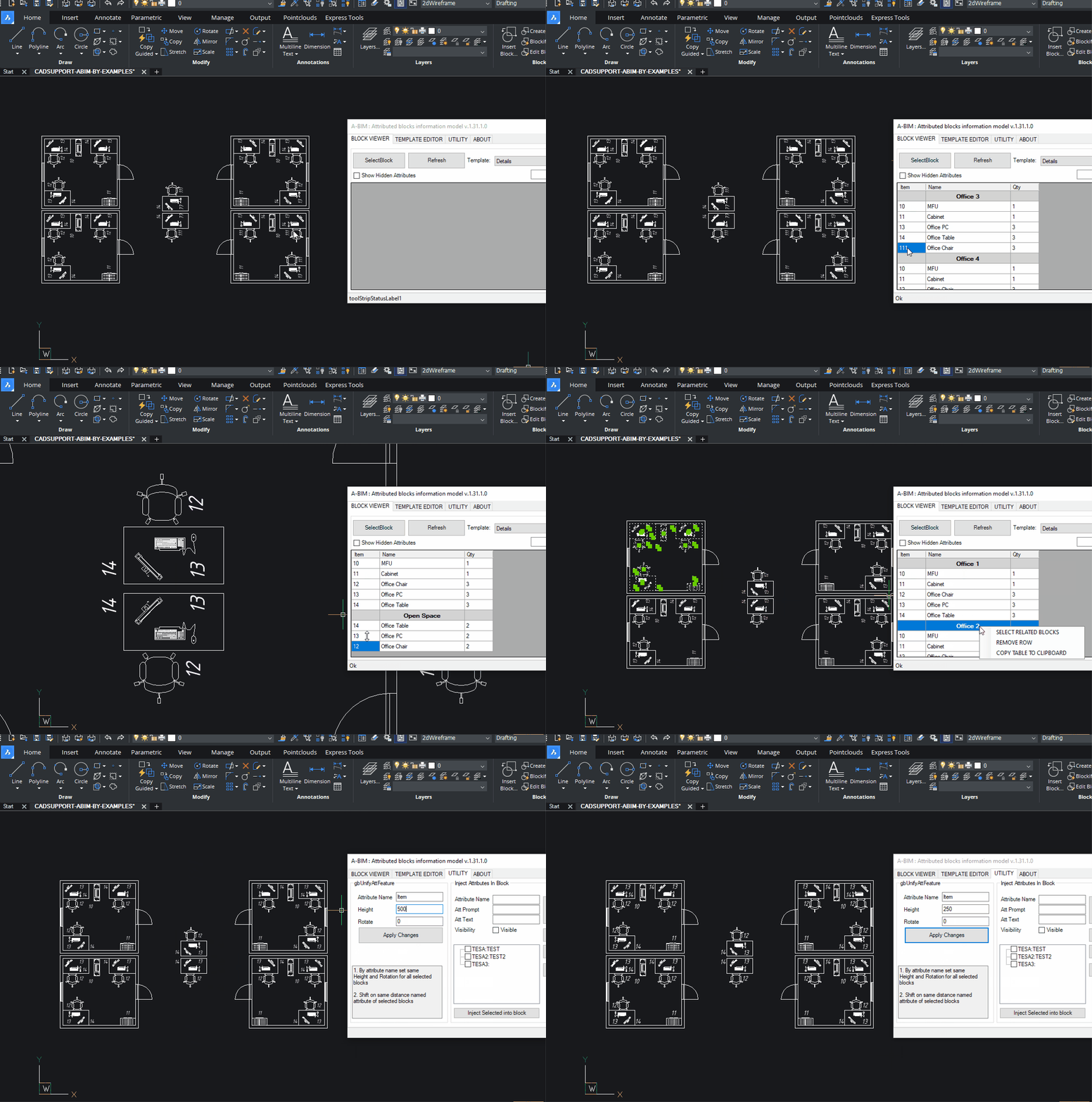
ABIM (Attribute Block Information Model)

A design pattern for 2D/3D CAD engineering, where meaningful elements are created as blocks with defined attributes.

With this approach, each item in a drawing is not merely a collection of lines and circles—it becomes an object containing both graphical and meta information.

ABIM is intended to save time for engineers on projects that are either not significant enough or not specifically suited for full BIM modeling. This includes various types of diagrams and plans such as:

  • P&ID (Piping and Instrumentation Diagrams)
  • Small HVAC layouts
  • Piping, electrical, automation and technology plans and diagrams
  • Melioration and agricultural projects

These can be created in 2D or 3D, whenever it is more cost-effective, faster, or more practical to design using traditional CAD systems.

ABIM allows the engineer to focus on the model itself, while all related schedules, tables, and documentation are automatically generated as derivative products of the block model.

Key Features

Based on predefined Templates

Order and sort as you expected, 1, 2, 17, 21 (other apps is 1,17,2,21)

Group, subgroup and etc. aggregation

Block arrays, infinite nested blocks,

Dynamic blocks with visibilities (visibility is attribute as well)

Easy to manage template editor with filters

Aggregate by concatenation.

Dynamic props considered as attributes

Edit group attributes values in table at once

Unify block instance attribute

Select blocks and groups in model from table

Export and import of templates

Attributes injection to blocks

BricsCAD – autoload .net app

If you write a plugins in .Net and want to make this app available in BricsCad after startup seems the most reliable way is to add following keys to you Registry:

Windows Registry Editor Version 5.00

[HKEY_LOCAL_MACHINE\SOFTWARE\Bricsys\ObjectDRX\V21x64\Applications\YourApplicationName]
"Loader"="C:\\Temp\\YourAssembly.dll"
"Managed"=dword:00000001
"LoadCtrls"=dword:00000002
"Description"="Your description"
Where LoadCtrls = 2 is loading at startup.


Seems there is not much info about Registry structure details at documentatation but there is some:

https://help.bricsys.com/en-us/document/knowledge-base/installation/bricscad-registry-structure?id=165245343756

and this one is about how to get/set BricsCAD templates and references folders:


https://help.bricsys.com/en-us/document/knowledge-base/installation/when-and-how-is-bricscad-initialized-using-root-folders?id=165245343864